Task Management Software
" Finish the most important tasks and stop wasting time on irrelevant activities. "
This Activity Planner module is a smart task management system designed to help organizations plan, organize and manage everyday work more efficiently. It supports task creation, planning, assignment, tracking and reporting, making it easier to stay on top of daily operations without manual follow-ups.
With this ERP task management software, you no longer need to worry about tracking employee performance or deciding who should handle which task. The system gives you clear visibility into how much work each employee has completed, what tasks are currently in progress, which activities are pending and how much time and manpower are being used for each client or project.
The module also functions as an effective employee task management system, allowing managers and team leaders to assign tasks, monitor progress and make quick decisions based on real-time project status. Whether it is an individual task or a full project, everything stays organized in one place.
In addition, team leaders can easily plan upcoming work, review task timelines and improve overall productivity. Integrated features like the DMS module and comment module make this project task management tool a complete solution for smooth work coordination and better team collaboration across your organization.
ERP Task Management Software Solutions
ERP Task Management Software Module
This project task management tool is designed to help organizations manage office work smoothly by focusing on every small activity involved in daily operations. From adding project details to assigning tasks and tracking them until completion, this module ensures complete control and clarity throughout the task lifecycle.
Using this ERP task management system, tasks can be assigned by managers or between employees, with every activity recorded for future reference. Tasks are organized into multiple categories such as meetings, deadlines, emails, calls and business-related activities. This structured approach reduces complexity and makes the system easy to use for everyone.
The module works as an efficient employee task management system, creating a transparent and organized working environment for employees as well as business owners. It helps teams stay aligned, reduces confusion and improves overall productivity across departments.
To create and manage tasks, the module follows a few simple steps:
Selection
You can prioritize tasks based on urgency such as low, medium, high or urgent, using the task management software.
Details
Add the task subject, description and required information. You can also include client-related details to keep all information in one place within the ERP task management system.
Task Distribution
Assign tasks to the right employee and associate supporting team members where required. This ensures clear ownership and smooth execution.
Allotted Time
Set a fixed time for each task so employees can work within defined timelines. The system also sends alerts for overdue tasks, helping teams stay on schedule with the ERP task management software.
Task Status
Below are the different task statuses available in our ERP task management system, showing how a task progresses from assignment to completion.
Pending Task
When a task is assigned to an employee but has not yet been started or checked out, it remains in the pending stage. This helps teams clearly identify unstarted work.
Check Out
Once an employee starts working on a task, they can check out the task to indicate active work. This status helps managers see how many employees are currently working on each task through the employee task management system.
Check In
When an employee takes a break or finishes work for the day, they can check in and update task progress. The task then moves to “In Process,” showing how much work has been completed.
Task Completed
After the task is fully completed and marked by the employee, it is automatically moved from pending or in-process to the completed section. This ensures accurate task closure.
On Hold
Tasks can be placed on hold if further confirmation or input is required before continuing. This helps avoid confusion and keeps task flow organized within the ERP task management system.
Task Cancellation
If a task is no longer required, it can be cancelled. This option helps teams remove unnecessary tasks and maintain a clean task list using the task management software.
Overdue
If a task is not completed within the defined time limit, it is marked as overdue. This allows managers to quickly identify delays and take corrective action.

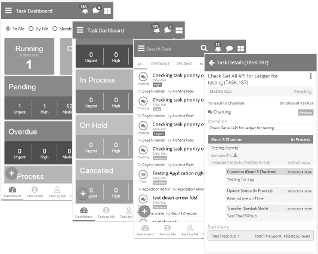
Task Management Mobile App
It provides a clear view of all tasks and helps teams stay aligned even when working remotely.


Task Dashboard
The Task Dashboard is a central activity monitoring system designed to help teams stay focused on daily work. It provides real-time visibility into tasks and supports better planning and execution.
Task By Me
Task To Me
Task Monitoring
Features of our ERP task management software
By digitizing and streamlining daily operations, our ERP task management software helps organizations do more with fewer resources. It improves communication, enables better collaboration, enhances data security and ensures easy access to task information. As part of a structured task management system, it keeps business operations running smoothly and efficiently.
Exclusive Reminder
This feature provides automatic reminders to keep users updated on pending tasks. It helps employees stay on schedule and ensures no important activity is missed.
Comment Module
The comment module allows employees and supporting team members to add comments on specific tasks. This improves collaboration and clarity by enabling real-time discussion.
One-Touch Away Moderation
With mobile access, users can monitor tasks, check current status, and manage activities anytime and anywhere. Tasks can also be created and assigned directly from the mobile interface using the task management mobile app ERP.
Popup Notification
Instant popup notifications keep users informed about task updates and activity changes. Whether a task is checked in, checked out or completed, alerts help employees track progress and complete work on time.
Transfer Option
If an employee is unable to complete a task, it can be transferred to another team member without disrupting workflow. This ensures continuity and smooth task handling within the task management system.
Task Management Report
This report provides detailed insights into each task, including the assigned employee, time limits, due dates, task subject and total time taken for completion. It helps organizations analyze productivity, time usage and employee performance using a structured task management system.
With this reporting feature, managers can better understand employee efficiency, workload distribution, and task execution patterns. The data generated through the ERP task management software supports informed decision-making and helps identify strengths and improvement areas within teams.
" Finish the most important tasks and stop wasting time on irrelevant activities."
